
English
Answers that stay attached to their questions
A form is two documents printed on one sheet: the questions, boxes and small-print instructions that were there before anyone touched it, and the answers somebody added afterwards. Read it as flat text and the two layers interleave into nonsense — a surname next to the words “Family name”, a tick with nothing to tick. Evidano keeps them apart, pairs each response with the field it belongs to, and tells you when a box was left empty rather than quietly skipping it.
Sample pages
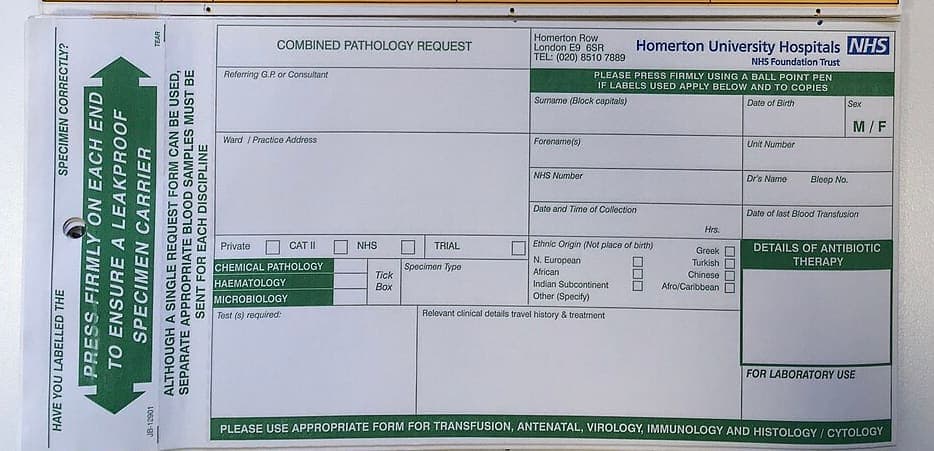
Source · CC BY-SA 4.0 · Photograph by Admiral Rolland
Evidano Transcription
HAVE YOU LABELLED THE
SPECIMEN CORRECTLY?
PRESS FIRMLY ON EACH END
TO ENSURE A LEAKPROOF
SPECIMEN CARRIER
TEAR
ALTHOUGH A SINGLE REQUEST FORM CAN BE USED,
SEPARATE APPROPRIATE BLOOD SAMPLES MUST BE
SENT FOR EACH DISCIPLINE
JB-12901
COMBINED PATHOLOGY REQUEST
Homerton Row
London E9 6SR
TEL: (020) 8510 7889
Homerton University Hospitals NHS
NHS Foundation Trust
| Referring G.P. or Consultant | PLEASE PRESS FIRMLY USING A BALL POINT PEN IF LABELS USED APPLY BELOW AND TO COPIES | ||
|---|---|---|---|
| Ward / Practice Address | Surname (Block capitals) | Date of Birth | Sex M / F |
| Forename(s) | Unit Number | ||
| NHS Number | Dr's Name Bleep No. | ||
| Date and Time of Collection Hrs. | Date of last Blood Transfusion | ||
| Private ☐ CAT II ☐ NHS ☐ TRIAL ☐ | Ethnic Origin (Not place of birth) N. European ☐ African ☐ Indian Subcontinent ☐ Other (Specify) ☐ | Greek ☐ Turkish ☐ Chinese ☐ Afro/Caribbean ☐ |
| Tick Box | Specimen Type | DETAILS OF ANTIBIOTIC THERAPY | |
|---|---|---|---|
| CHEMICAL PATHOLOGY | |||
| HAEMATOLOGY | |||
| MICROBIOLOGY |
| Test (s) required: | Relevant clinical details travel history & treatment | FOR LABORATORY USE |
|---|
PLEASE USE APPROPRIATE FORM FOR TRANSFUSION, ANTENATAL, VIROLOGY, IMMUNOLOGY AND HISTOLOGY / CYTOLOGY
Generated by Evidano’s advanced model; not yet checked against a published edition.
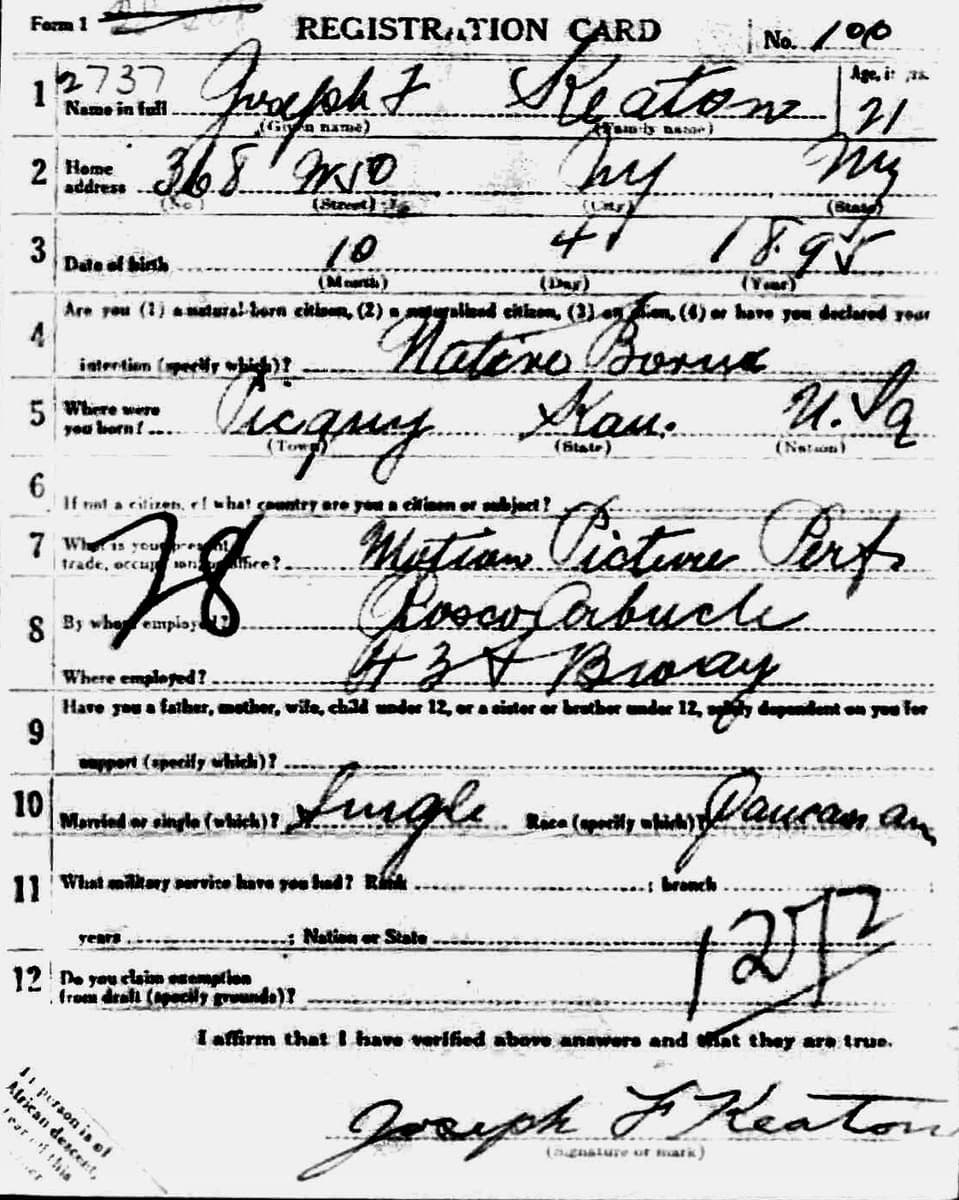
National Archives and Records Administration, 5 June 1917 · Source · Public domain
Evidano Transcription
Form 1 REGISTRATION CARD No. 100
| Question | Answer | |
|---|---|---|
| 1 | Name in full (Given name) (Family name) | 2737 Joseph F Keaton |
| Age, in yrs. | 21 | |
| 2 | Home address (No.) (Street) (City) (State) | 368 W 10 · Ny · Ny |
| 3 | Date of birth (Month) (Day) (Year) | 10 · 4 · 1895 |
| 4 | Are you (1) a natural-born citizen, (2) a naturalized citizen, (3) an alien, (4) or have you declared your intention (specify which)? | Native Born |
| 5 | Where were you born? (Town) (State) (Nation) | Picquy · Kan. · U.S.a |
| 6 | If not a citizen, of what country are you a citizen or subject? | |
| 7 | What is your present trade, occupation, or office? | 28 Motion Picture Perf. |
| 8 | By whom employed? | Rosco Arbucle |
| Where employed? | 43[illegible] Broway | |
| 9 | Have you a father, mother, wife, child under 12, or a sister or brother under 12, solely dependent on you for support (specify which)? | |
| 10 | Married or single (which)? | Single |
| Race (specify which)? | Caucasian | |
| 11 | What military service have you had? Rank; branch; years; Nation or State | 1272 |
| 12 | Do you claim exemption from draft (specify grounds)? |
I affirm that I have verified above answers and that they are true.
Joseph F Keaton
(Signature or mark)
If person is of African descent, tear off this corner
Generated by Evidano’s advanced model; not yet checked against a published edition.
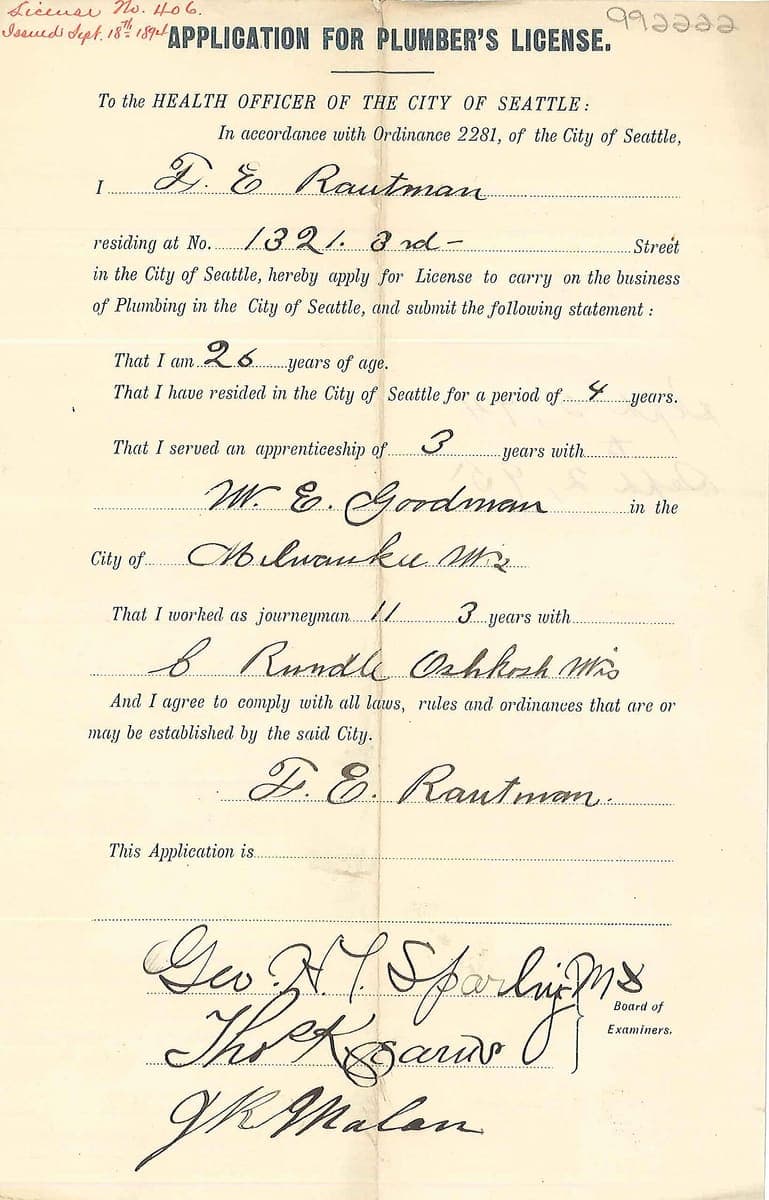
Seattle Municipal Archives, 18 September 1894 · Source · CC BY 2.0 · Seattle Municipal Archives, via Flickr
Evidano Transcription
License No. 406.
Issued Sept. 18th 1894
992222
APPLICATION FOR PLUMBER'S LICENSE.
To the HEALTH OFFICER OF THE CITY OF SEATTLE:
In accordance with Ordinance 2281, of the City of Seattle,
I F. E. Rautman
residing at No. 1321. 3rd - Street
in the City of Seattle, hereby apply for License to carry on the business
of Plumbing in the City of Seattle, and submit the following statement:
That I am 26 years of age.
That I have resided in the City of Seattle for a period of 4 years.
That I served an apprenticeship of 3 years with
W. E. Goodman in the
City of Milwauku Wis
That I worked as journeyman // 3 years with
C Rundle Oshkosh Wis
And I agree to comply with all laws, rules and ordinances that are or
may be established by the said City.
F. E. Rautman
This Application is
Geo H. Sparling MD
Thos K Bairds
J K Malan
Board of
Examiners.
F. E. Rautman
This Application is ...................................................
Geo. H. T. Sparling M.D. Board of
[illegible] Examiners.
[illegible]
Generated by Evidano’s advanced model; not yet checked against a published edition.
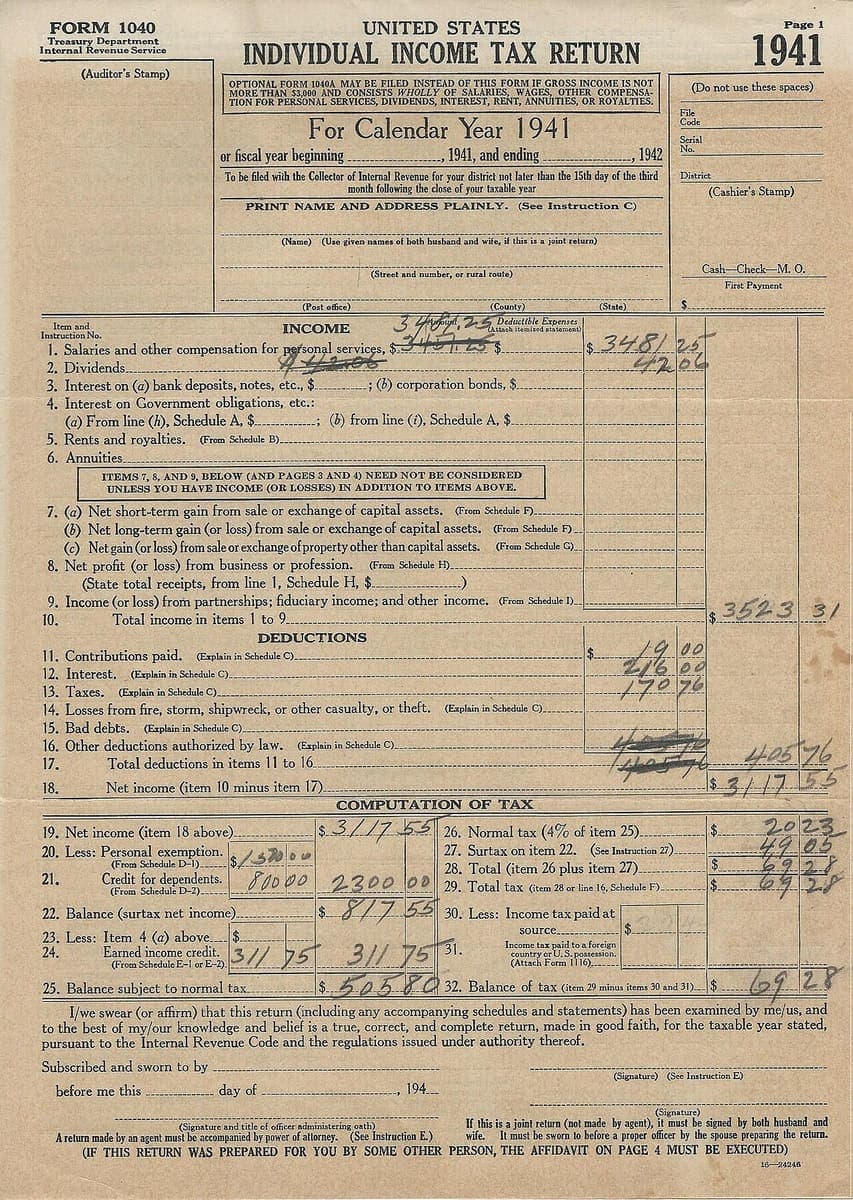
Internal Revenue Service, tax year 1941 · Source · Public domain
Evidano Transcription
FORM 1040
Treasury Department
Internal Revenue Service
(Auditor's Stamp)
UNITED STATES
INDIVIDUAL INCOME TAX RETURN
OPTIONAL FORM 1040A MAY BE FILED INSTEAD OF THIS FORM IF GROSS INCOME IS NOT
MORE THAN $3,000 AND CONSISTS WHOLLY OF SALARIES, WAGES, OTHER COMPENSA-
TION FOR PERSONAL SERVICES, DIVIDENDS, INTEREST, RENT, ANNUITIES, OR ROYALTIES.
For Calendar Year 1941
or fiscal year beginning ____________________, 1941, and ending ____________________, 1942
To be filed with the Collector of Internal Revenue for your district not later than the 15th day of the third
month following the close of your taxable year
PRINT NAME AND ADDRESS PLAINLY. (See Instruction C)
(Name) (Use given names of both husband and wife, if this is a joint return)
(Street and number, or rural route)
(Post office) (County) (State)
Page 1
1941
(Do not use these spaces)
File
Code
Serial
No.
District
(Cashier's Stamp)
Cash—Check—M. O.
First Payment
$________________________
| Item and Instruction No. INCOME | ||||
|---|---|---|---|---|
| 1. Salaries and other compensation for personal services, $ [cancelled: 3457.25] \3481.25/ | Deductible Expenses (Attach itemized statement) $ _________ | $ 3481 | 25 | |
| 2. Dividends [cancelled: 42.06] | 42 | 06 | ||
| 3. Interest on (a) bank deposits, notes, etc., $ _________ ; (b) corporation bonds, $ _________ | ||||
| 4. Interest on Government obligations, etc.: | ||||
| (a) From line (h), Schedule A, $ _________ ; (b) from line (i), Schedule A, $ _________ | ||||
| 5. Rents and royalties. (From Schedule B) | ||||
| 6. Annuities | ||||
| ITEMS 7, 8, AND 9, BELOW (AND PAGES 3 AND 4) NEED NOT BE CONSIDERED UNLESS YOU HAVE INCOME (OR LOSSES) IN ADDITION TO ITEMS ABOVE. | ||||
| 7. (a) Net short-term gain from sale or exchange of capital assets. (From Schedule F) | ||||
| (b) Net long-term gain (or loss) from sale or exchange of capital assets. (From Schedule F) | ||||
| (c) Net gain (or loss) from sale or exchange of property other than capital assets. (From Schedule G) | ||||
| 8. Net profit (or loss) from business or profession. (From Schedule H) | ||||
| (State total receipts, from line 1, Schedule H, $ _________ ) | ||||
| 9. Income (or loss) from partnerships; fiduciary income; and other income. (From Schedule I) | ||||
| 10. Total income in items 1 to 9 | $ 3523 | 31 | ||
| DEDUCTIONS | ||||
| 11. Contributions paid. (Explain in Schedule C) | $ 19 | 00 | ||
| 12. Interest. (Explain in Schedule C) | 216 | 00 | ||
| 13. Taxes. (Explain in Schedule C) | 170 | 76 | ||
| 14. Losses from fire, storm, shipwreck, or other casualty, or theft. (Explain in Schedule C) | ||||
| 15. Bad debts. (Explain in Schedule C) | ||||
| 16. Other deductions authorized by law. (Explain in Schedule C) | ||||
| 17. Total deductions in items 11 to 16 | [cancelled: 405] | [cancelled: 76] | 405 | 76 |
| 18. Net income (item 10 minus item 17) | $ 3117 | 55 |
COMPUTATION OF TAX
| 19. Net income (item 18 above) | $ 3117 | 55 |
| 20. Less: Personal exemption. (From Schedule D-1) $ 1500 00 | ||
| 21. Credit for dependents. (From Schedule D-2) 800 00 | 2300 | 00 |
| 22. Balance (surtax net income) | $ 817 | 55 |
| 23. Less: Item 4 (a) above $ _________ | ||
| 24. Earned income credit. (From Schedule E-1 or E-2) 311 75 | 311 | 75 |
| 25. Balance subject to normal tax | $ 505 | 80 |
| 26. Normal tax (4% of item 25) | $ 20 | 23 |
| 27. Surtax on item 22. (See Instruction 27) | 49 | 05 |
| 28. Total (item 26 plus item 27) | $ 69 | 28 |
| 29. Total tax (item 28 or line 16, Schedule F) | $ 69 | 28 |
| 30. Less: Income tax paid at source $ _________ | ||
| 31. Income tax paid to a foreign country or U.S. possession. (Attach Form 1116) _________ | ||
| 32. Balance of tax (item 29 minus items 30 and 31) | $ 69 | 28 |
I/we swear (or affirm) that this return (including any accompanying schedules and statements) has been examined by me/us, and to the best of my/our knowledge and belief is a true, correct, and complete return, made in good faith, for the taxable year stated, pursuant to the Internal Revenue Code and the regulations issued under authority thereof.
Subscribed and sworn to by ________________________________________________________________________________
(Signature) (See Instruction E)
before me this _______________ day of ____________________________, 194
(Signature and title of officer administering oath) (Signature)
A return made by an agent must be accompanied by power of attorney. (See Instruction E.) If this is a joint return (not made by agent), it must be signed by both husband and wife. It must be sworn to before a proper officer by the spouse preparing the return.
(IF THIS RETURN WAS PREPARED FOR YOU BY SOME OTHER PERSON, THE AFFIDAVIT ON PAGE 4 MUST BE EXECUTED)
16-24246
Generated by Evidano’s advanced model; not yet checked against a published edition.
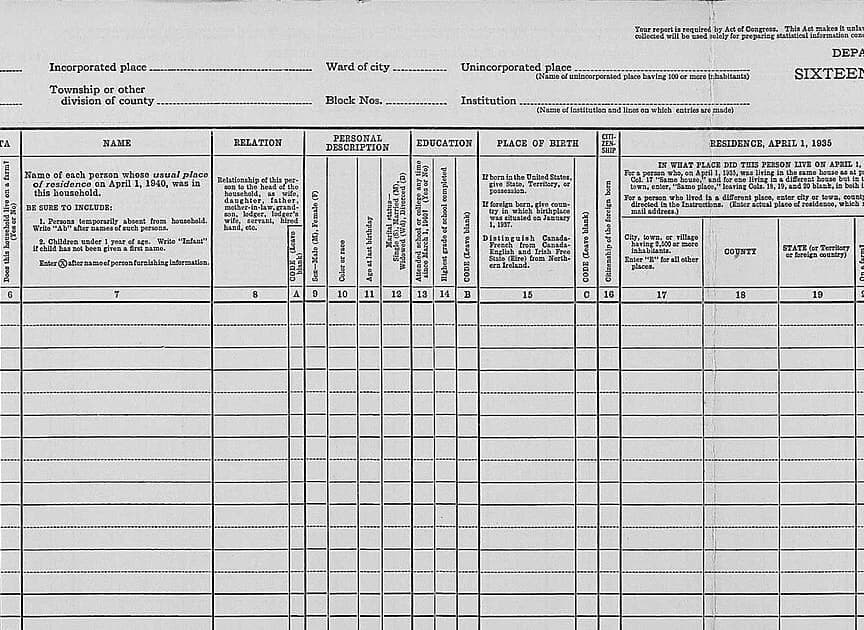
United States Census Bureau, 1940 · Source · Public domain
Evidano Transcription
Your report is required by Act of Congress. This Act makes it unla[illegible]
collected will be used solely for preparing statistical information con[illegible]
DEPA[illegible]
SIXTEEN[illegible]
Incorporated place ................ Ward of city ................ Unincorporated place ................
(Name of unincorporated place having 100 or more inhabitants)
Township or other division of county ................ Block Nos. ................ Institution ................
(Name of institution and lines on which entries are made)
| Col. | Heading |
|---|---|
| 6 | [illegible]TA — Does this household live on a farm? (Yes or No) |
| 7 | NAME — Name of each person whose usual place of residence on April 1, 1940, was in this household. BE SURE TO INCLUDE: 1. Persons temporarily absent from household. Write "Ab" after names of such persons. 2. Children under 1 year of age. Write "Infant" if child has not been given a first name. Enter ⊗ after name of person furnishing information. |
| 8 | RELATION — Relationship of this person to the head of the household, as wife, daughter, father, mother-in-law, grandson, lodger, lodger's wife, servant, hired hand, etc. |
| A | CODE (Leave blank) |
| 9 | PERSONAL DESCRIPTION — Sex—Male (M), Female (F) |
| 10 | Color or race |
| 11 | Age at last birthday |
| 12 | Marital status—Single (S), Married (M), Widowed (Wd), Divorced (D) |
| 13 | EDUCATION — Attended school or college any time since March 1, 1940? (Yes or No) |
| 14 | Highest grade of school completed |
| B | CODE (Leave blank) |
| 15 | PLACE OF BIRTH — If born in the United States, give State, Territory, or possession. If foreign born, give country in which birthplace was situated on January 1, 1937. Distinguish Canada-French from Canada-English and Irish Free State (Eire) from Northern Ireland. |
| C | CODE (Leave blank) |
| 16 | CITIZENSHIP — Citizenship of the foreign born |
| 17 | RESIDENCE, APRIL 1, 1935 — City, town, or village having 2,500 or more inhabitants. Enter "R" for all other places. |
| 18 | COUNTY |
| 19 | STATE (or Territory or foreign country) |
| [illegible] | On a farm[illegible] |
Residence, April 1, 1935 — instructions:
IN WHAT PLACE DID THIS PERSON LIVE ON APRIL 1, [illegible]
For a person who, on April 1, 1935, was living in the same house as at p[illegible]
Col. 17 "Same house," and for one living in a different house but in t[illegible]
town, enter, "Same place," leaving Cols. 18, 19, and 20 blank, in both i[illegible]
For a person who lived in a different place, enter city or town, county[illegible]
directed in the Instructions. (Enter actual place of residence, which [illegible]
mail address.)
Generated by Evidano’s advanced model; not yet checked against a published edition.
The two layers on a completed form
The printed layer is dense and highly structured. A form usually carries a title and a form number, a block of instructions in smaller type, numbered items, field labels with sub-labels in brackets underneath the rule (“(Given name)”, “(Street and number)”), comb boxes that take one character per cell, tick boxes and radio circles, rating scales, and one or more panels reserved for the office that will process the sheet. Some of the printed text is rotated ninety degrees along the edge; some of it is a conditional instruction that applies only to certain lines, as on a census schedule where supplementary questions are asked only of the people entered on two particular rows.
The response layer is whatever the person in front of the form did. Block capitals for a name, joined writing for the rest, a tick or a cross or a diagonal stroke or a circle round the chosen option, a figure written over another figure without the first being crossed out, a dash or “N/A” or nothing at all where a question did not apply. Answers routinely leave their boxes: a long address wraps into the field below, an explanation carries on up the margin with a bracket, an amount is written across the dollars-and-cents divider rather than either side of it.
Then there is everything added after the form was handed in. A rubber stamp with a date, a reference number written diagonally across the sheet in a different pen, an approval initialled in red, a coding mark made by a clerk preparing the data for punching, a note that the licence was issued and when. These belong to the file rather than to the respondent, and a transcription that treats them as answers will attach a clerk’s reference number to whichever question it happens to overlap.
Why ordinary OCR struggles here
The label and the answer are separate things
Plain text extraction returns the words in the order they appear on the page, which mixes the questionnaire with its responses. What you actually want is a pairing: item 7 asks for the present trade or occupation, the answer is “Motion Picture Perf”. Without the pairing you cannot load the sheet into a spreadsheet, and you cannot tell a printed example answer from a real one.
Empty boxes carry meaning
A blank field can mean the question did not apply, that the respondent refused, that the enumerator skipped it under an instruction, or that the form was never finished. Silently dropping empty fields destroys all four possibilities, and makes an incomplete return look like a complete one. Blanks have to be reported as blanks, and distinguished from fields the model could not read.
Marks are not characters
Ticks, crosses, dots, filled bubbles and circles drawn round a printed word are answers, but no letter corresponds to them. Add the human tendency to put the mark between two boxes, or to tick and then cross out, and the interesting cases are exactly the ones a character recogniser cannot represent at all.
Writing that will not stay in its box
Comb boxes assume one letter per cell and long names ignore them. An explanation runs past the ruled line into the next question. A pencilled correction sits above the figure it replaces. Deciding which field a stray line of writing belongs to needs the geometry of the blank form, not just the ink on this copy.
Who works with this material
Records teams digitising a back-file
Licence applications, permits, membership forms and registration cards sit in boxes because keying them costs more than they are worth one at a time. Field-and-value output turns a run of identical sheets into rows, and the exceptions — a form filled in wrongly, an unsigned declaration — surface instead of being averaged away.
Survey and evaluation teams
Paper questionnaires still come back from clinics, classrooms and doorsteps. What matters is that a rating is read as the point on the scale that was marked, that free-text comments stay attached to the question that prompted them, and that partially completed returns are visibly partial when they reach the analysis.
Genealogists and archive indexers
Census schedules, enlistment papers and registration cards are the backbone of family history, and their value depends on names, ages and places being read exactly. An indexer wants the enumerator’s own spelling, the crossings-out, and a flag on anything doubtful, not a tidied version.
Administrators handling sensitive returns
Medical request forms, benefit claims and consent forms carry identifiers that most downstream uses do not need. Being able to capture the clinical or operational fields while holding back names, numbers and dates of birth is often the difference between a usable workflow and one that cannot be approved.
Getting the best transcription
Show the blank form first
If you have an unused copy of the same form, transcribe that before the completed ones. It gives you the printed layer on its own — every label, every instruction, the position of every box — so the completed sheets can be read as answers against a known template rather than deciphered from scratch each time.
Ask for pairs, not paragraphs
Request the output as field and value, one per line or as JSON, and say what an untouched field should look like: an empty string, the word “blank”, or an explicit note that the enumerator was told to skip it. That single decision is what makes a stack of forms loadable into a spreadsheet.
Spell out how marks should be reported
Say whether a tick, a cross and a circled option should all come back as “checked”, and what should happen when a mark straddles two boxes or an option is ticked and then struck out. Ambiguous marks are better reported as ambiguous than resolved by a coin toss.
Decide about personal data before you start
Forms are the most identity-dense documents most people scan. Say in the prompt which fields should be redacted or replaced by a placeholder — name, address, date of birth, reference numbers — and check that they really are absent from the first few outputs before you run the batch.
Frequently asked questions
- How does it know which answer belongs to which question?
- From the geometry of the sheet: the position of the writing relative to the rule, the box and the label, and the numbering of the items. On a form where the questions run on as sentences, the answer is the writing inside the sentence, and it is returned against the printed wording that surrounds it.
- Are ticks, crosses and circled options recognised?
- Yes, and they are reported as the state of the field rather than as characters. A ticked box, a crossed box, a filled circle and a ring drawn round a printed word are all treated as a selection; a mark that sits between two options or that has been struck out again is flagged rather than assigned.
- Can it tell an empty field from one it could not read?
- These are reported differently. An empty field comes back as empty; writing that is present but illegible is marked as unread, so a person can go back to the image. Conflating the two is how partly completed forms turn into confident, wrong data.
- What happens when the answer runs outside its box?
- The writing is assigned to the field it started in, and the overflow is kept with it rather than split between two fields or moved into the answer below. Where a comb box has been ignored and a name written straight across the cells, the name is read as a word.
- Can names and identifiers be kept out of the transcription?
- Yes. You can ask for named fields to be redacted or replaced with a placeholder so that the structure and the substantive answers survive without the identity. This is worth doing on any batch of medical, benefit or membership forms before the text goes anywhere else.
Related scripts and pages
Turn a box of completed forms into rows
Upload a blank form and a filled one, choose Forms and Questionnaires, and check the field pairing before you run the rest of the batch.