
English
Tell the interface apart from what people wrote
Most of the words in a screenshot were put there by the software, not by a person: menus, tab labels, a battery percentage, a button that says Configure. The part you actually want is usually a few lines in the middle, half of it ending in an ellipsis because the window was too narrow. Evidano separates the content from the chrome, keeps the handle, timestamp and counts attached to the message they belong to, and says plainly where the text was cut off.
Sample pages
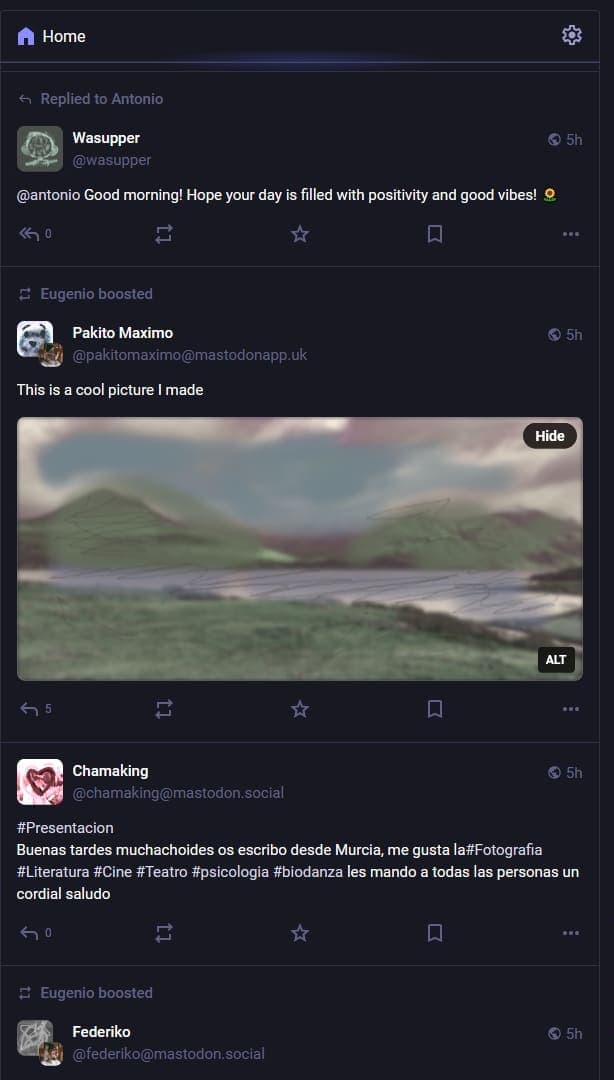
Source · CC0 1.0 · Modified screenshot of a Mastodon instance; text, names and avatars replaced by the uploader
Evidano Transcription
Home
Replied to Antonio
Wasupper 5h
@wasupper
@antonio Good morning! Hope your day is filled with positivity and good vibes! 🌻
0
Eugenio boosted
Pakito Maximo 5h
@pakitomaximo@mastodonapp.uk
This is a cool picture I made
Hide
ALT
5
Chamaking 5h
@chamaking@mastodon.social
#Presentacion
Buenas tardes muchachoides os escribo desde Murcia, me gusta la#Fotografia
#Literatura #Cine #Teatro #psicologia #biodanza les mando a todas las personas un
cordial saludo
0
Eugenio boosted
Federiko 5h
@federiko@mastodon.social
Generated by Evidano’s advanced model; not yet checked against a published edition.
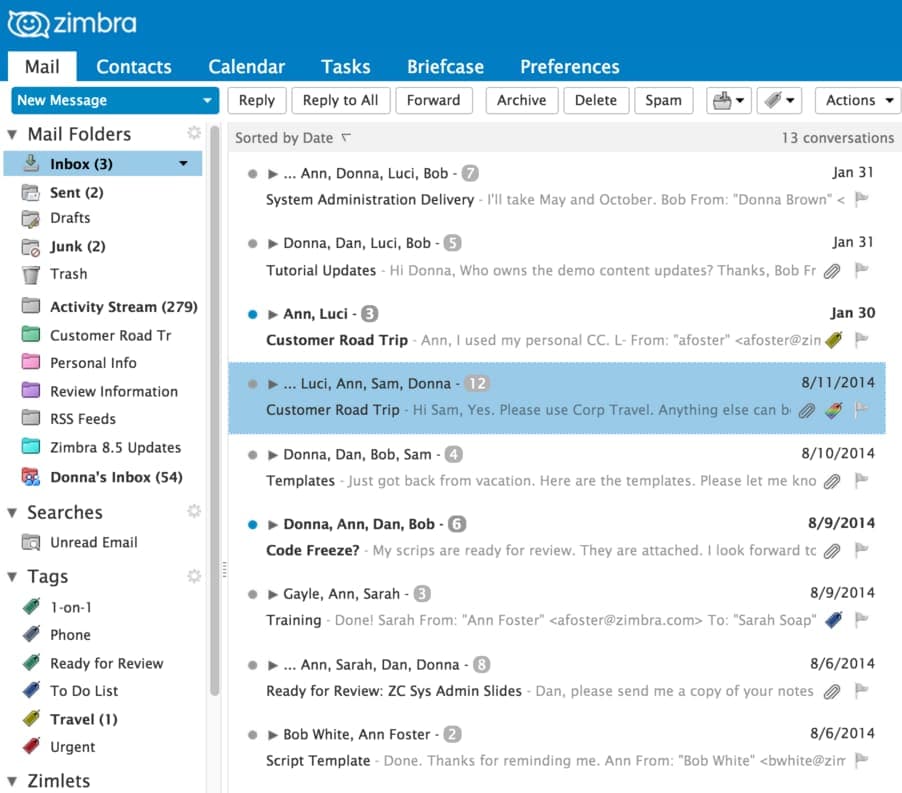
Evidano Transcription
zimbra
Mail Contacts Calendar Tasks Briefcase Preferences
New Message Reply Reply to All Forward Archive Delete Spam Actions
▼ Mail Folders
Inbox (3)
Sent (2)
Drafts
Junk (2)
Trash
Activity Stream (279)
Customer Road Tr
Personal Info
Review Information
RSS Feeds
Zimbra 8.5 Updates
Donna's Inbox (54)
▼ Searches
Unread Email
▼ Tags
1-on-1
Phone
Ready for Review
To Do List
Travel (1)
Urgent
▼ Zimlets
Sorted by Date 13 conversations
● ▶ ... Ann, Donna, Luci, Bob - 7 Jan 31
System Administration Delivery - I'll take May and October. Bob From: "Donna Brown" <
● ▶ Donna, Dan, Luci, Bob - 5 Jan 31
Tutorial Updates - Hi Donna, Who owns the demo content updates? Thanks, Bob Fr
● ▶ Ann, Luci - 3 Jan 30
Customer Road Trip - Ann, I used my personal CC. L- From: "afoster" <afoster@zin
● ▶ ... Luci, Ann, Sam, Donna - 12 8/11/2014
Customer Road Trip - Hi Sam, Yes. Please use Corp Travel. Anything else can b
● ▶ Donna, Dan, Bob, Sam - 4 8/10/2014
Templates - Just got back from vacation. Here are the templates. Please let me kno
● ▶ Donna, Ann, Dan, Bob - 6 8/9/2014
Code Freeze? - My scrips are ready for review. They are attached. I look forward tc
● ▶ Gayle, Ann, Sarah - 3 8/9/2014
Training - Done! Sarah From: "Ann Foster" <afoster@zimbra.com> To: "Sarah Soap"
● ▶ ... Ann, Sarah, Dan, Donna - 8 8/6/2014
Ready for Review: ZC Sys Admin Slides - Dan, please send me a copy of your notes
● ▶ Bob White, Ann Foster - 2 8/6/2014
Script Template - Done. Thanks for reminding me. Ann From: "Bob White" <bwhite@zim
Generated by Evidano’s advanced model; not yet checked against a published edition.
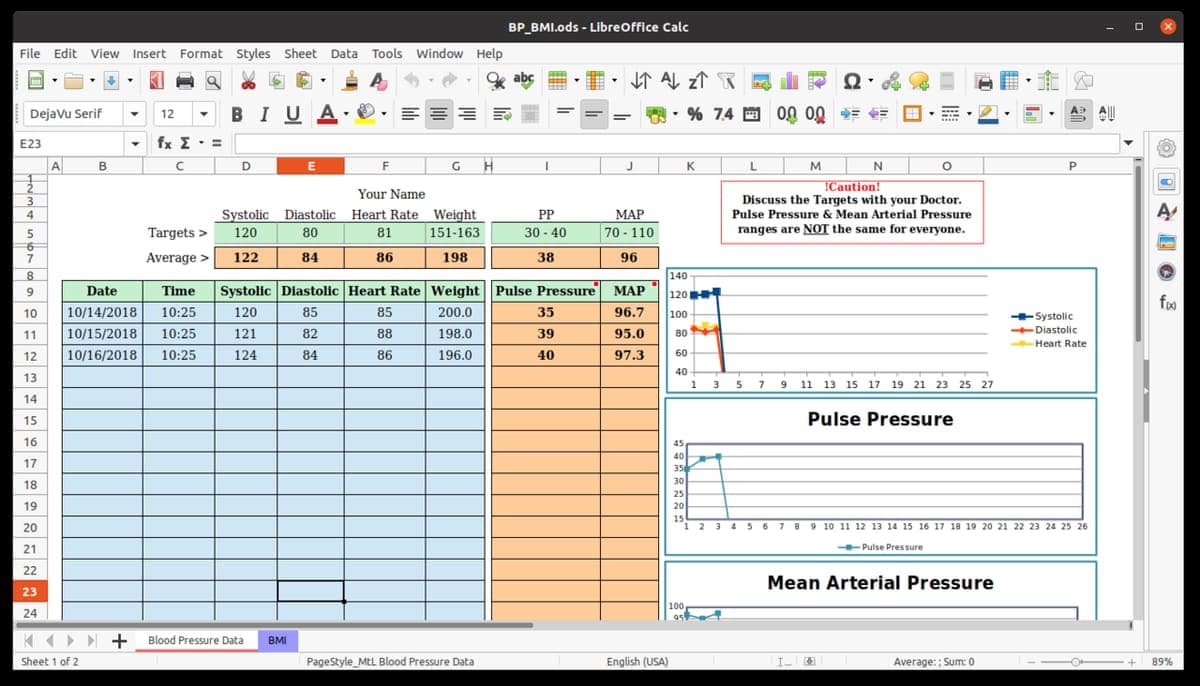
Source · CC BY-SA 4.0 · Screenshot by Jasozh
Evidano Transcription
BP_BMI.ods - LibreOffice Calc
File Edit View Insert Format Styles Sheet Data Tools Window Help
DejaVu Serif 12 B I U A % 7.4 .00 .00
E23 fx Σ =
A B C D E F G H I J K L M N O P
1 2 3 4 5 6 7 8 9 10 11 12 13 14 15 16 17 18 19 20 21 22 23 24
Your Name
Systolic Diastolic Heart Rate Weight PP MAP
Targets > 120 80 81 151-163 30 - 40 70 - 110
Average > 122 84 86 198 38 96
| Date | Time | Systolic | Diastolic | Heart Rate | Weight | Pulse Pressure | MAP |
|---|---|---|---|---|---|---|---|
| 10/14/2018 | 10:25 | 120 | 85 | 85 | 200.0 | 35 | 96.7 |
| 10/15/2018 | 10:25 | 121 | 82 | 88 | 198.0 | 39 | 95.0 |
| 10/16/2018 | 10:25 | 124 | 84 | 86 | 196.0 | 40 | 97.3 |
!Caution!
Discuss the Targets with your Doctor.
Pulse Pressure & Mean Arterial Pressure
ranges are NOT the same for everyone.
140
120
100
80
60
40
1 3 5 7 9 11 13 15 17 19 21 23 25 27
Systolic
Diastolic
Heart Rate
Pulse Pressure
45
40
35
30
25
20
15
1 2 3 4 5 6 7 8 9 10 11 12 13 14 15 16 17 18 19 20 21 22 23 24 25 26
Pulse Pressure
Mean Arterial Pressure
100
95
◀ ◀ ▶ ▶ + Blood Pressure Data BMI
Sheet 1 of 2 PageStyle_MtL Blood Pressure Data English (USA) Average: ; Sum: 0 - + 89%
Generated by Evidano’s advanced model; not yet checked against a published edition.
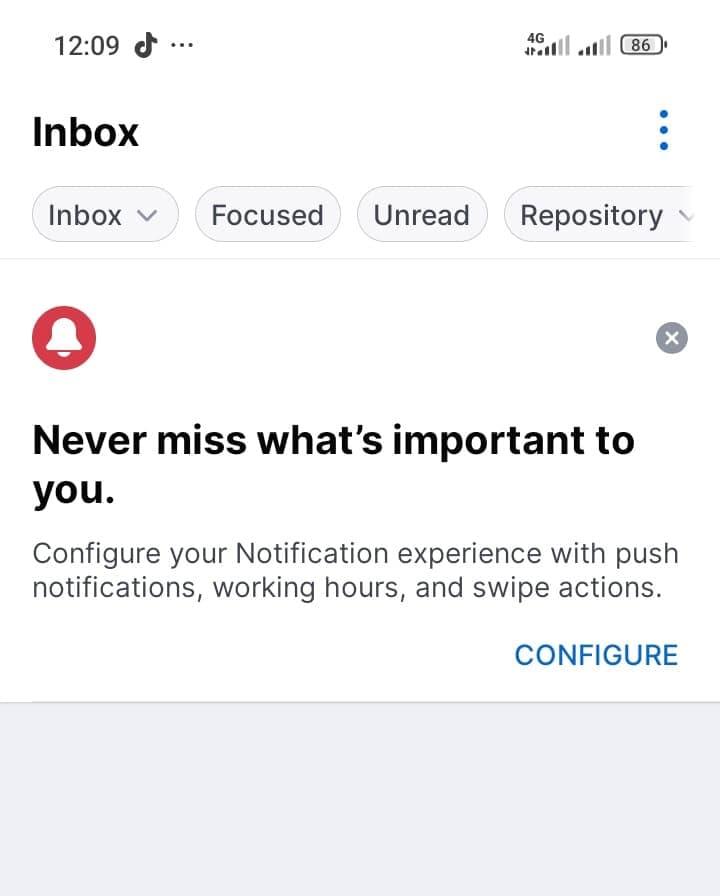
Source · CC BY-SA 4.0 · Screenshot by Chinwoke 01
Evidano Transcription
12:09 ... 4G 86
Inbox
Inbox Focused Unread Repository
Never miss what's important to you.
Configure your Notification experience with push
notifications, working hours, and swipe actions.
CONFIGURE
Generated by Evidano’s advanced model; not yet checked against a published edition.
What is actually on the screen
A screenshot has layers in the same way a scanned page does, but they are stacked rather than spread out. At the outside is the operating system: a clock, a signal indicator, a battery figure, a home bar. Inside that is the application: a title bar, menus, toolbars with tooltips, a sidebar of folders with unread counts in brackets, tabs at the bottom of a spreadsheet, a status bar reporting the sheet number and the zoom level. Inside that again is the document or the feed. Floating over everything there may be a dialog, a notification, a cookie banner or a tooltip that hides part of what is underneath.
Feeds and conversations carry their own grammar. A display name and an @handle are different strings and both matter. A post may be prefixed with a line saying who boosted or shared it, or who it replies to, which belongs to the post below rather than the post above. Timestamps are relative — “5h”, “yesterday” — and the absolute time only appears on hover. Reaction, reply and share counts sit under the message as bare numbers; hashtags, mentions and links are styled differently from ordinary words; an attached image may carry its own badges, such as ALT or Hide. In a chat, the sender is encoded in which side of the screen the bubble sits on and nowhere else.
The screen also does things to text that paper never does. A long subject line is truncated with an ellipsis; a filter chip is sliced in half at the edge of the display; a cell’s contents are clipped by the next cell rather than wrapped; a list continues past the bottom of the capture, so the screenshot is a window on something larger. Dark themes invert the contrast, and a screenshot that has been shared through two messaging apps arrives re-compressed, with the small type softened into grey.
Why ordinary OCR struggles here
Chrome reads exactly like content
“File”, “Edit”, “Home”, “Explore”, “Profile” and “Delete” are perfectly ordinary English words, and a text extractor has no reason to treat them differently from a sentence someone typed. Dumped into one stream they surround the real message with menu labels, and on a screenshot of an empty inbox they are all you get.
Panes, columns and conversation order
A mail client shows a folder tree, a message list and a reading pane at once; a social client shows a composer, a timeline and a trending sidebar. Read line by line these interleave. Working out which pane is the content, and then which order the messages in it run, is a question about the interface rather than about the pixels.
Text that was never fully shown
An ellipsis at the end of a preview means the sentence continues somewhere the screenshot cannot reach. Completing it is a fabrication, and dropping the ellipsis hides the fact that the text is partial. The same applies to a row clipped by the bottom of the window and a label sliced by the edge of the screen.
Interface type is small and often re-compressed
Status bars and metadata are set at ten or eleven pixels, which is legible on the original display and marginal once the image has been scaled down and passed through two rounds of JPEG. The characters that suffer first — digits in a timestamp, a count, a version number — are the ones people screenshot the interface to record.
Who works with this material
Support and quality assurance teams
Bug reports arrive as screenshots of error dialogs, console output and half-loaded pages. Getting the exact wording of a message, the version number in the status bar and the identifier in a stack trace into text is what makes a ticket searchable and lets a duplicate be found before someone investigates it twice.
Researchers and journalists archiving posts
A post can be edited or deleted, and a screenshot is often the only record. Capturing the handle, the display name, the timestamp and the counts as separate fields, rather than as a run of text, is what makes a set of captures analysable and citable later.
Technical writers and accessibility reviewers
Documentation and audits depend on quoting interface labels exactly as they appear, including capitalisation and the wording of tooltips. Pulling the strings out of a set of captures is faster than retyping them and much less likely to introduce a label that does not exist in the product.
Compliance and evidence handling
Screenshots of messages and transactions are routinely submitted as evidence. What is needed is a faithful reading, an explicit note where an overlay hides text or a line is truncated, and no reconstruction of the parts the capture does not show.
Getting the best transcription
Capture rather than photograph
Use the device’s own screenshot function at full resolution and send the original file. A photograph of a monitor adds moiré, glare and keystone distortion to type that was already small, and a screenshot that has been pasted into a document and re-exported has usually lost the metadata line you wanted to read.
Say which part of the screen you care about
Name the region — the message list, the centre column, the dialog — or ask for interface chrome to be collected separately from content. On a capture of an empty screen that distinction is the whole result; on a busy one it removes several hundred words you would otherwise have to filter out.
Ask for conversations as structured turns
For a chat or a feed, request each message as a record with author, handle, timestamp, text and counts, and say how boost or reply prefixes should be attached. That is far more useful than a paragraph, and it makes the order of the conversation explicit rather than implied by position.
State the rule for truncation and overlays
Decide whether a preview ending in an ellipsis should be marked as incomplete, and whether text hidden behind a tooltip or a notification should be reported as obscured. Both are cases where the honest answer is a flag, and both are cases where a model left to itself may quietly finish the sentence.
Frequently asked questions
- Are handles, hashtags, mentions and emoji preserved exactly?
- Yes. The @handle is kept with its server or domain, hashtags keep their hash, links are returned as the text shown rather than the underlying address, and emoji are kept as characters rather than described. Where a display name and a handle differ, both are reported.
- Can it work out who said what in a chat screenshot?
- Bubble alignment, colour, avatars and any name labels are used to attribute each message, and the order is read from the top of the capture down. Where a conversation is genuinely ambiguous — two participants, no names, both bubbles the same colour — the attribution is reported as uncertain rather than invented.
- What happens to text that ends in an ellipsis?
- It is transcribed as far as it is visible and marked as truncated. Nothing is completed from context, because the missing words are not in the image. The same applies to a row cut off by the bottom edge of the capture or a chip sliced by the side of the screen.
- Will menu and button labels end up mixed into my text?
- Only if you want them. Interface elements are identified as such and can be returned in a separate list, omitted, or kept in place with a label. For documentation work the interface strings are the point; for archiving a post they are noise.
- Can it read a photograph of a screen rather than a screenshot?
- Often, but expect the small type to suffer. Screen photographs bring moiré from the pixel grid, reflections, and a perspective that makes one side of the display smaller than the other. If the figures in a status bar or a timestamp matter, retake it with the device’s screenshot function.
Related scripts and pages
Get the words out of a screenshot
Upload a capture of a chat, a feed, a spreadsheet or an error dialog, choose Screenshots and Digital Captures, and say which part of the screen you want.